EasyCAM5000 - Browser-Based CAM Tools for Makers
Free, open-source manufacturing software that runs entirely in your browser. From PCB isolation routing to 4th-axis woodworking. Zero installations, definitely no accounts or cloud.
EasyTrace5000 Live
A PCB CAM tool. Converts Gerber, Excellon and SVG into CNC G-code, or into laser-ready SVG/PNG for copper ablation and paste stencils. Client-side replacement for FlatCAM.
EasyShape5000 Live
A CNC router CAM tool for SVG and STL. Profile, pocket, drill and engrave, plus V-carving, 3D relief and 4th-axis rotary with a 3D toolpath view. Client-side replacement for Easel.
EasyTrace5000 PCB CAM Tool
EasyTrace5000 is a free, open-source CAM tool purpose-built for PCB prototyping. It takes the standard fabrication files your EDA software exports - Gerber RS-274X copper layers, Excellon drill files, and SVG outlines - and generates what your machine needs to make the board.
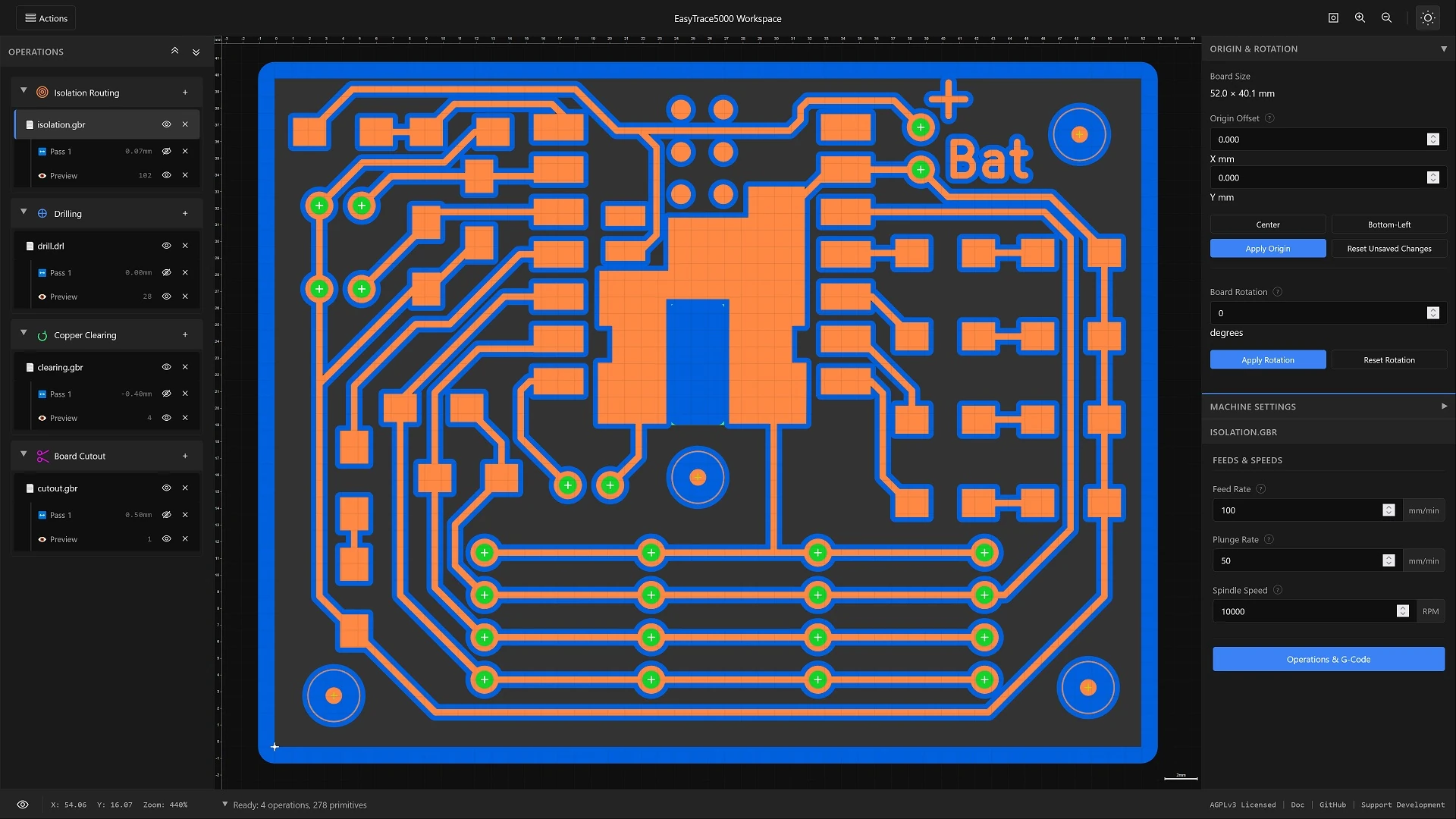
Five operations cover a board start to finish: multi-pass copper isolation, copper clearing, drilling with a per-diameter tool table, board cutout with holding tabs, and solder-paste stencils. You pick the machine per operation, so a single board can have its copper ablated by a laser, its holes and outline milled on a router, and its stencil cut on a drag knife - from one project and one set of files.
Developed and tested against KiCad and EasyEDA output. Exporting Gerber with Protel file extensions lets drag-and-drop assign each file to the operation that expects it.
EasyShape5000 CNC Router CAM Tool
EasyShape5000 is the router side of the suite. Import SVG artwork or an STL mesh, arrange and transform shapes on a scene graph, assign an operation to each one, and export G-code.
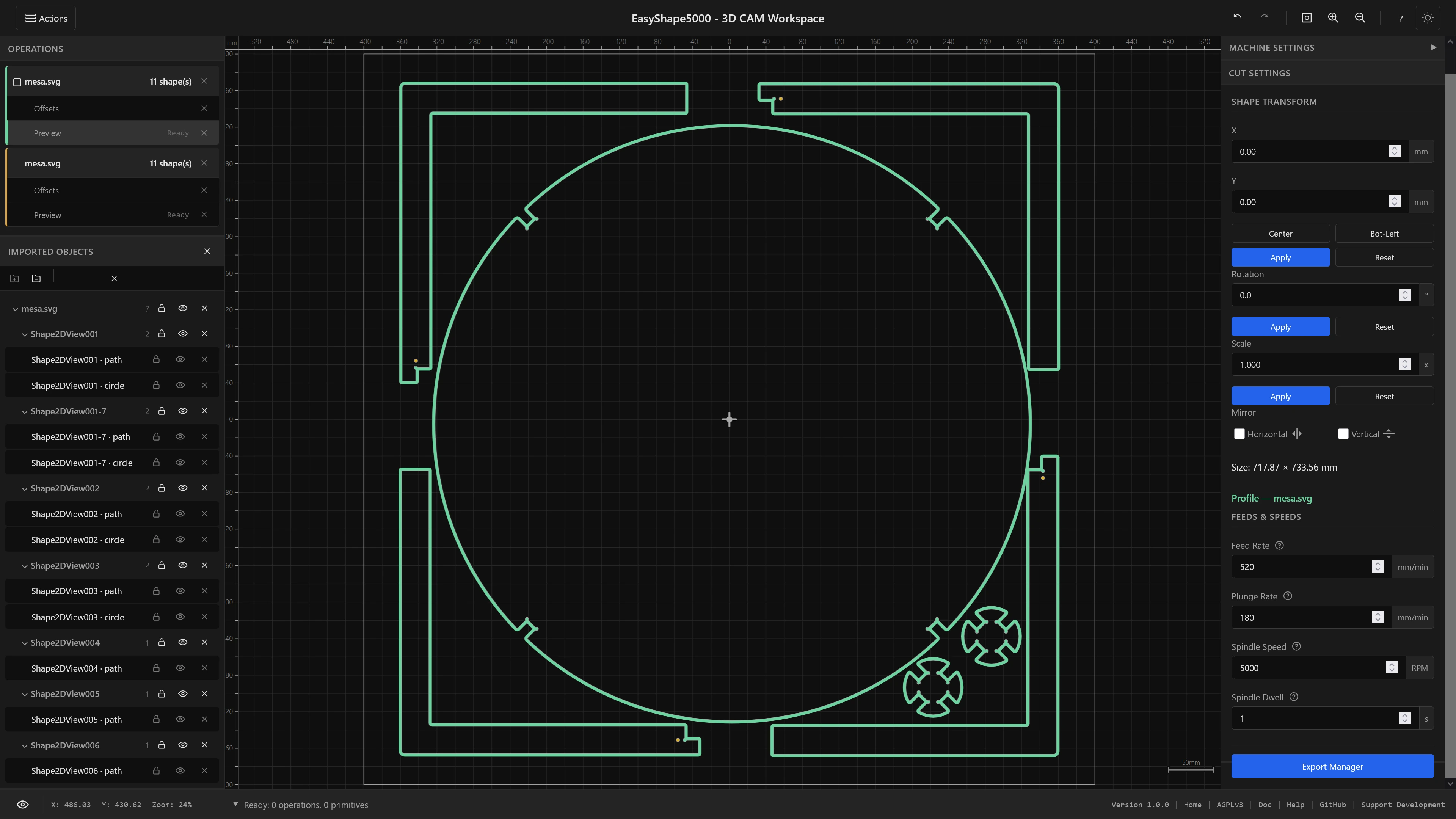
Profile cutting with holding tabs, pocket clearing, drilling and centreline engraving handle flat work. V-carving, 3D relief from a mesh and 4th-axis rotary - continuous or indexed 3+1 - handle everything that is not flat, with a 3D view to check the toolpaths before you cut.
It shares the file parsers, the geometry engine and every post-processor with EasyTrace5000. What differs is the interface and the operation set.
Which One Do I Want?
| EasyTrace5000 | EasyShape5000 | |
|---|---|---|
| Input | Gerber, Excellon, SVG | SVG, STL |
| Working model | one file per operation | per-shape operation buckets |
| Transforms | board level | per-shape/nested group |
| Undo / redo | no | full history |
| Machines | CNC router, laser/drag knife | CNC router |
| 3D operations | no | V-carve, relief, rotary |
| Output | G-code, SVG, PNG | G-code |
What Both Apps Give You
A staged workflow
Set parameters, generate, look at the result, move on. Each step keeps its own layer you can show, hide and redo on its own - so changing a feed rate never costs you the geometry you already generated.
Real arcs in the output
Curves are exported as G2 and G3 arc commands rather than hundreds of tiny line segments. Smaller files, smoother motion, and no stuttering where your machine has to chew through a polygon approximation.
Tool changes and length offsets
Automatic tool changes on posts that support them, with explicit, implicit or probe-based tool length compensation. Drill operations can assign a different bit and tool number to every hole size.
3D and 4th-axis toolpaths
V-carving with true variable depth, relief surfacing from a mesh with the tool's real tip shape accounted for, and rotary machining in continuous or indexed 3+1 - previewed in 3D before you commit.
Keyboard operable
Full keyboard navigation with focus zones, a navigable tree, focus-trapped dialogs and screen-reader announcements. Accessibility target is WCAG 2.1 Level AA.
Nothing leaves your machine
Every file you open is processed in browser memory. No upload, no cloud processing, no account. Close the tab and nothing is left anywhere.
Formats In and Out
The suite reads the fabrication files exported by PCB tools like KiCad, EasyEDA, Altium and Eagle, and the vector and mesh formats used by design and modelling software.
| Format | Extensions | Used by |
|---|---|---|
| Gerber (RS-274X) | .gbr .ger .gtl .gbl .gts .gbs .gbx .gko .gml .gm1 | EasyTrace5000 |
| Excellon drill | .drl .xln .txt .tap .drill .exc | EasyTrace5000 |
| SVG | .svg | both |
| STL mesh | .stl (binary and ASCII) | EasyShape5000 |
| G-code out | extension follows the post-processor | both |
| Vector & raster out | .svg hairline, .png up to 4000 DPI | EasyTrace5000 |
SVG support covers the full path spec including arcs and Bézier curves, and preserves group hierarchies from Inkscape, Illustrator or Figma. Clones and clip paths are not supported.
Post-Processors
Ten dialects ship with the suite, shared by both apps:
GRBL · grblHAL · UCCNC · Mach3 · LinuxCNC · Fanuc · WinPC-NC · Makera (Carvera) · Marlin · Roland RML
Each sets its own file extension, arc format and tool-change dialect.
How It Works
The same three steps in both apps, from design file to machine instructions.
1 - Load and position
Drop your files in. Set where the machine origin sits and how the work is placed, then configure the machine once: post-processor, clearance heights, feeds and speeds.
2 - Set parameters and generate
Pick a tool, set the operation's parameters, and generate. Look at what came out on the canvas, adjust, generate again. Nothing you do here is destructive.
3 - Toolpaths and export
Generate toolpaths, inspect them in 2D or 3D, then order your operations and export - G-code for a router, colour-coded SVG or PNG for a laser or knife.
Documentation
Before You Cut
Check the output before you rely on it
This is hobbyist software written by one person. The post-processors are in use and working, but "controller X, firmware Y" covers a lot of ground - read the first program a new post produces, or run it in the air, before you put it near material.
The laser route is in beta; check exported files in your laser software before firing. Reporting what works on your machine is the single most useful contribution anyone can make - what works is as useful to hear as what does not.
Open Source
EasyCAM5000 is licensed under the AGPLv3 and developed in the open by Eltryus. The full source, the changelog and the issue tracker are on GitHub. Bug reports with a file attached - and confirmations that a post-processor works on your machine - are worth more than code right now.
Support EasyCAM5000
Support covers development time, hosting, and the test hardware needed to cover more machines directly instead of relying on user reports.

Contact us about sponsorship →
Manufacturers and industry partners get visibility on the welcome screen and throughout the documentation