Development goes fast, documentation may be outdated. Proceed with some caution.
EasyShape5000 Documentation
Flat cutting, V-carving, 3D relief and 4th-axis rotary, from SVG and STL
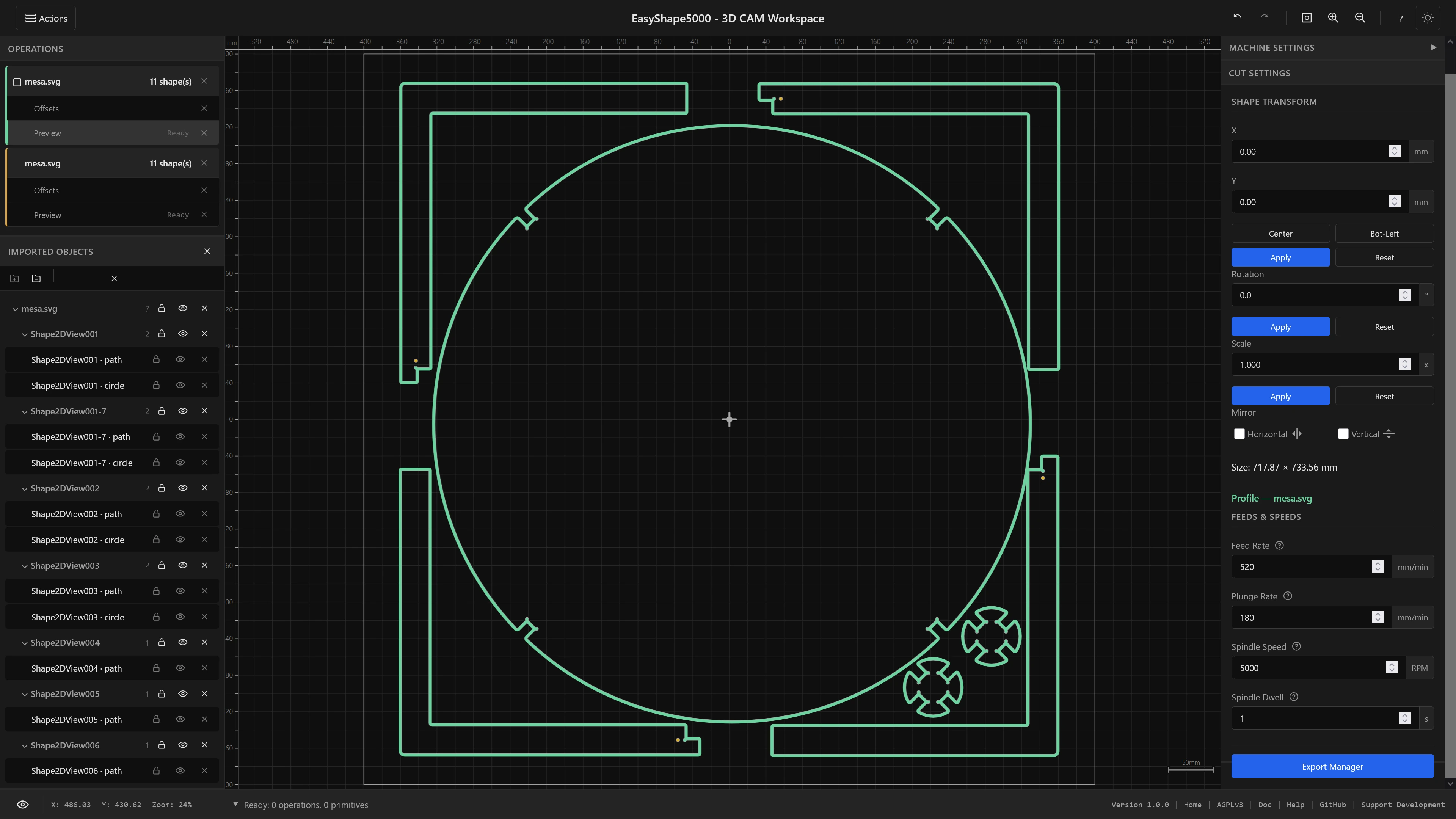
What is EasyShape5000?
EasyShape5000 is an open-source, browser-based CAM tool for CNC routers. It reads SVG artwork and STL meshes and writes G-code: profile cuts, pocket clearing, drilling and engraving from vectors, and V-carving, 3D relief and 4th-axis rotary from meshes. A browser-native alternative to Easel or Carbide Create that does not stop at flat work.
Like its sister app EasyTrace5000, built for PCB fabrication, everything runs on your own machine. No installation, no cloud, no accounts.
Current Status
Profile, pocket, drilling and engraving are stable. The 3D set - V-carve, relief, and rotary in both continuous and indexed 3+1 - is newer and under active testing, as is automatic tool changing. Report anything odd on GitHub.
Operations
Operations are assigned per shape. Select shapes, drop them into an operation bucket, set the parameters, generate. Seven produce toolpaths today.
| Operation | What it does | Source | Status |
|---|---|---|---|
| Profile Cut | Cuts along an outline - outside, inside or on the line - with optional holding tabs | SVG | Stable |
| Pocket Clear | Clears the interior of a closed shape, leaving nested shapes standing as islands | SVG | Stable |
| Drill Holes | Turns circles and obrounds into holes or slots, with a strategy chosen per size | SVG | Stable |
| Engrave | Follows a path exactly with no offset, on open or closed geometry | SVG | Stable |
| V-Carve | Variable-depth carving that follows the shape's width, with flat floors where the bit bottoms out | SVG | Beta |
| Relief / 2.5D Carve | Carves a mesh as a surface, with roughing passes and a finishing pass | STL | Beta |
| Rotary / 4th Axis | Continuous machining while the blank spins, or flat faces at fixed angles (indexed 3+1) | STL | Beta |
What each one is for, the tools it wants and the parameters it exposes are on the Operation Guide.
Supported File Formats
SVG (Scalable Vector Graphics)
Full path support including lines, arcs, and quadratic and cubic Bézier curves. Group structures from Inkscape, Illustrator or Figma are preserved in the scene tree. Clones and clip paths are not supported.
STL (Mesh)
Binary and ASCII, for relief and rotary work. The mesh is re-read every time you generate, so resolution, orientation and Z datum stay editable parameters rather than import settings.
Quick Start
- Import: drag and drop an SVG - or an STL, for relief and rotary - onto the canvas, or use Actions → Import.
- Select: click shapes on the canvas or in the scene tree. Shift-click or drag a marquee for several.
- Assign: pick an operation from the tabs on the right. The shapes drop into a new bucket.
- Geometry: set tool, cut side, step-over and the rest, then Generate.
- Depth: flat operations only - set cut depth, passes and entry, then Generate Preview.
- Toolpaths: set feeds, speeds and tool number, then Generate Toolpaths. The canvas switches to 3D; the toolbar view button or F2 takes you back.
- Export: open the Export Manager, order your operations, pick a post-processor and download.
The Workflow Guide walks through all of it in detail.
EasyShape or EasyTrace?
| EasyShape5000 | EasyTrace5000 | |
|---|---|---|
| Built for | general CNC routing | PCB fabrication |
| Input | SVG, STL | Gerber, Excellon, SVG |
| Working model | scene graph, an operation per shape | one file per operation |
| Transforms | per-shape move, rotate, scale, mirror, nested groups | board origin, rotation, mirror |
| Undo / redo | full history | no |
| Machines | CNC router | CNC router, laser, vinyl/drag knife |
Keyboard Shortcuts
Everything here has a button or a menu entry too - these are the shortcuts once you know your way around.
View
- F / = / Home Fit to view
- + / - Zoom in / out
- G Toggle grid
3D View
- F2 Toggle 2D / 3D
- W Wireframe
- Drag to orbit, wheel to zoom
Selection
- Click Select shape
- Shift+Click Toggle
- Ctrl+A Select all
- Alt+Click Select inside a group
Scene
- Ctrl+G Group
- Ctrl+Shift+G Ungroup
- Delete Delete selected
Editing
- Ctrl+Z Undo
- Ctrl+Shift+Z Redo
- I Import SVG
Navigation
- F6 Cycle focus zones
- F1 Help screen
- Esc Close / deselect
Post-Processors
Ten dialects ship with the suite, shared with EasyTrace5000:
GRBL · grblHAL · UCCNC · Mach3 · LinuxCNC · Fanuc · WinPC-NC · Makera (Carvera) · Marlin · Roland RML
Each sets its own file extension, arc format and tool-change dialect.
Check a new post before you rely on it
These are in use and working, but "controller X, firmware Y" covers a lot of ground and no one person can test all of it. Read the first program a new post produces, or run it in the air, and then say how it went - what works is as useful to hear as what does not.
The exception is Fanuc. It is being developed against one machine and has had no outside feedback at all, so treat it as unfinished rather than untested.
Project Sponsors
EasyShape5000 is open-source software supported by community sponsors.
Your logo displayed here and in documentation