Development goes fast, documentation may be outdated. Proceed with some caution.
EasyTrace5000 Documentation
Gerber, Excellon and SVG into isolation-routing G-code, laser-ready vectors and rasters, or drag-knife paste stencils
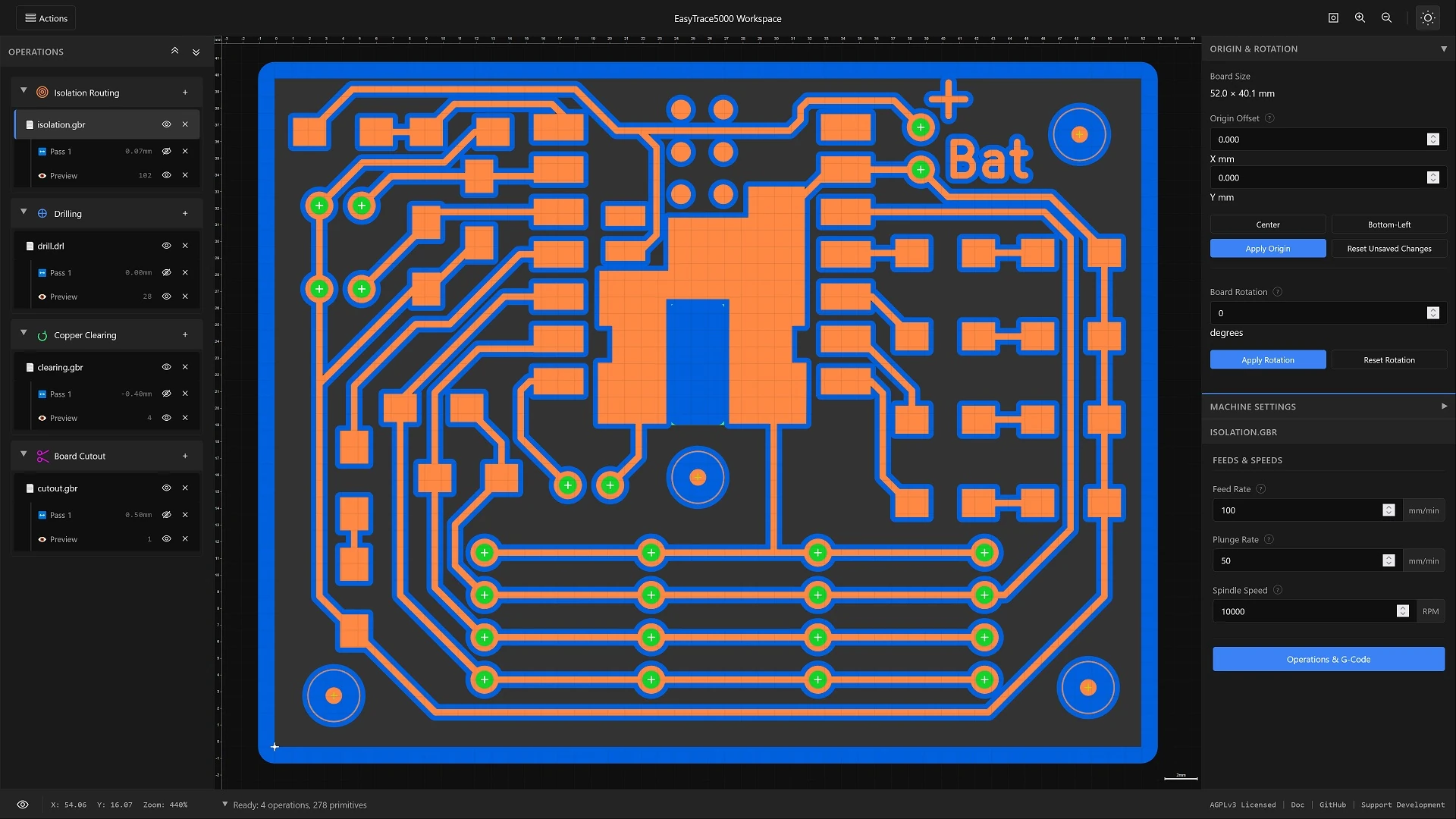
What is EasyTrace5000?
EasyTrace5000 is an open-source, browser-based CAM tool for PCB prototyping. It reads the files your EDA software already exports - Gerber RS-274X copper layers, Excellon drill files, SVG outlines - and produces what your machine needs: G-code for a CNC router, colour-coded SVG or high-DPI PNG for a laser, or a vector cut file for a vinyl cutter/drag knife.
Everything runs locally in your browser. No installation, no cloud uploads, no accounts. Your files stay on your machine.
You choose the machine per operation
There is no global mode to switch into. Every operation has its own machine setting, so one board can have its copper ablated by a laser while its holes and outline are milled on a router - same project, same source files, one export.
Pick a Guide
CNC Milling Stable
Multi-pass copper isolation, copper clearing, drilling with a per-diameter tool table, board cutout with holding tabs, and milled stencils. Ten post-processors, automatic tool changes, and a 3D toolpath view before you export.
Laser Processing Beta
Kerf-compensated vectors and high-DPI rasters for copper ablation, photoresist exposure and paste stencils. Concentric, filled and hatch clearing, with colour-coded layers for LightBurn or EZCAD.
What You Can Make
Five operations cover a board from copper to finished outline, plus its paste stencil. Each one takes a source file, a handful of parameters, and produces its own layer you can inspect before moving on.
| Operation | What it does | CNC router | Laser | Vinyl/Drag knife |
|---|---|---|---|---|
| Copper Isolation | Cuts a clearance channel around traces and pads so they end up separated | ✓ | ✓ | |
| Copper Clearing | Removes whole copper areas rather than just isolating them | ✓ | ✓ | |
| Drill | Holes and slots, with a strategy chosen per hole from its size | ✓ | ✓ | |
| Board Cutout | Cuts the board free, with holding tabs so it does not shift | ✓ | ✓ | |
| Stencil | Solder-paste apertures from your pad geometry | ✓ | ✓ | ✓ |
Full descriptions and the parameters each one uses are on the Operation Guide and the Parameter Guide.
Supported File Formats
Gerber (RS-274X)
Copper layers, soldermask and board outlines. Accepts .gbr .ger .gtl .gbl .gts .gbs .gbx .gko .gml .gm1, including macros, copper pours and flashed pad shapes.
Excellon
Drill files with hole positions, sizes and slot definitions. Accepts .drl .xln .txt .tap .drill .exc. Leading and trailing zero formats are both handled.
SVG
Full path support including arcs and Bézier curves, for custom outlines or hand-drawn artwork. Circles and obrounds can be promoted to drill geometry on import, so an SVG board can be drilled without an Excellon file.
Developed and tested against KiCad and EasyEDA output. Exporting Gerber with Protel file extensions lets drag-and-drop assign each file to the operation that expects it.
Quick Start
Both routes start the same way. The difference is how much you have to tell the machine.
CNC Milling
- Load your Gerber and Excellon files into the workspace.
- Position the board: origin, rotation, mirroring.
- Configure the machine: post-processor, clearance heights, speeds.
- Offsets: set tool and passes, then Generate Offsets.
- Preview: set depth and entry, then Generate Preview.
- Toolpaths: set feeds and tool number, then Generate Toolpaths. The canvas switches to 3D.
- Export: order your operations and download the G-code.
Full walkthrough in the CNC guide.
Laser Processing
- Load your Gerber or SVG files into the workspace.
- Position the board: origin, rotation, mirroring.
- Configure the machine: laser spot size, SVG or PNG output.
- Generate: pick a clearing strategy and generate.
- Export: assign layer colours and download.
There is no depth to set and no toolpath step - what you generate is what you export. Full walkthrough in the Laser guide.
Controls & Accessibility
Everything in EasyTrace5000 is done with buttons, menus and the tree - the shortcuts below are there once you know your way around, and for anyone who cannot use a pointer. The app is built to be fully keyboard-operable and targets WCAG 2.1 Level AA. F6 cycles between the four workspace zones so you never have to tab through a whole sidebar, modals trap focus and release it correctly, and status updates are announced through live regions. The Accessibility Guide has the complete list and the current per-guideline status.
Getting around
- F6 Cycle focus zones
- Shift+F6 Cycle backwards
- 1-5 Cycle operations
- F1 Help & shortcuts
- Esc Close / deselect
View
- F / = / Home Fit to view
- + / - Zoom in / out
- Arrows Pan (Shift for faster)
- F2 Toggle 2D / 3D
Display
- W Wireframe
- G Grid
- V Toggle layer visibility
Origin
- B Preview bottom-left
- C Preview centre
- O Save current origin
Operations tree
- ↑ / ↓ Move
- → / ← Expand / collapse
- Enter / Space Select
- Delete Remove
Reordering the export
- Space Grab an item
- ↑ / ↓ Move it
- Space Drop it
- Esc Cancel the grab
Doing Something Other Than PCBs?
EasyShape5000 is the router side of the suite: SVG and STL on a scene graph you can move, group and transform, with profile, pocket, drill and engrave plus V-carving, 3D relief and 4th-axis rotary. Same file support, same post-processors, a different interface and a different operation set.
Project Sponsors
EasyTrace5000 is open-source software supported by community sponsors.

Your logo displayed here and in documentation